
Most people who search for Xtreme HD IPTV want three answers before they pay anything: how much it really costs, what they get for that money, and whether they can get it running on their own TV tonight. This page puts all three in one place. You’ll find every plan with the real monthly price, a plain explanation of what “devices” means (the part that confuses most new customers), what’s included in the channel and movie library, and a short setup path for each type of device.
Quick answer: Xtreme HD IPTV is a subscription that gives you 20,000+ live channels and 40,000+ movies and series in HD and 4K, with a TV guide (EPG), catch-up and PPV events. Plans start at $15.99 for one month on one device and drop to about $11.67 a month on the 12-month plan. It works on Firestick, Android, Smart TVs, iPhone, Apple TV, Windows, Mac and MAG boxes using an IPTV player app.
Xtreme HD IPTV Plans and Prices in 2026
Every plan includes the same content. You aren’t choosing between a “basic” and a “premium” channel pack. You only choose two things: how long you want to pay for and how many screens need to play at the same time.
| Devices | 1 Month | 3 Months | 6 Months | 12 Months |
|---|---|---|---|---|
| 1 device | $15.99 | $45.99 | $74.99 | $139.99 |
| 2 devices | $25.99 | $65.99 | $95.99 | $179.99 |
| 3 devices | $35.99 | $75.99 | $105.99 | $199.99 |
| 4 devices | $55.99 | $85.99 | $115.99 | $219.99 |
| 5 devices | $65.99 | $95.99 | $125.99 | $239.99 |
Lifetime plans are also available: $499 for 1 device, $599 for 2, $699 for 3 and $799 for 4. There’s also a limited 2-year deal at $199.99 for one connection. Current prices are always on the Xtreme HD IPTV pricing page.
What you really pay per month
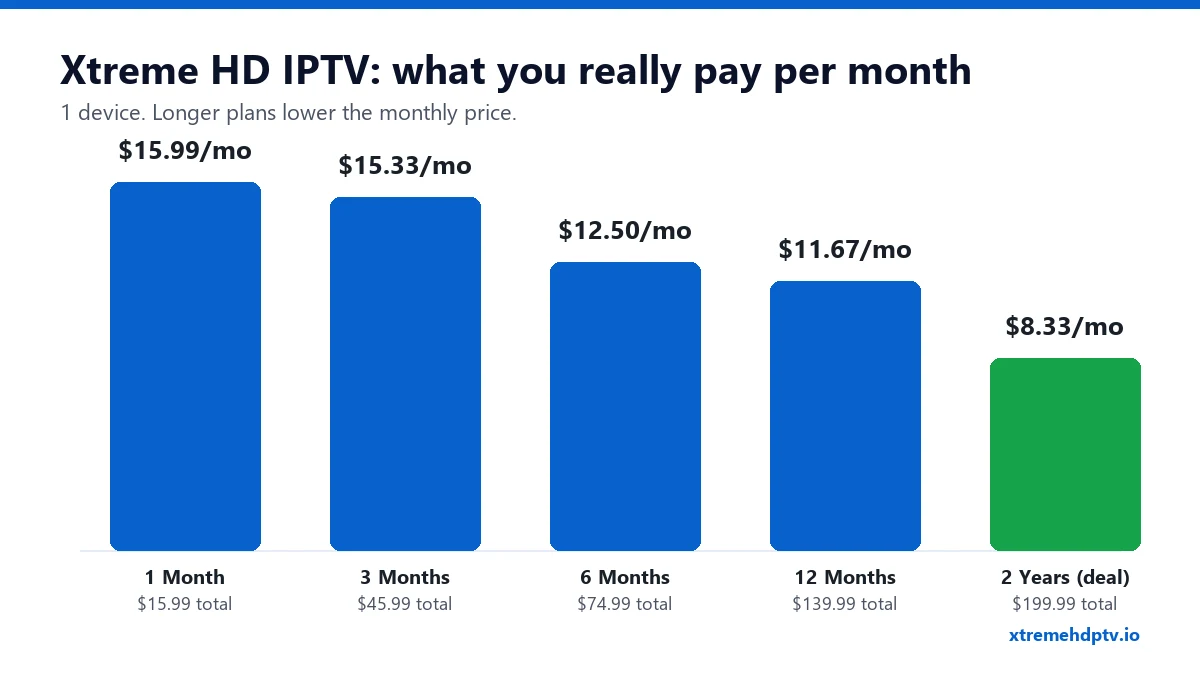
The sticker price hides the real difference between plans, so here it is per month for a single device:
- 1 month: $15.99 a month
- 3 months: $15.33 a month
- 6 months: $12.50 a month
- 12 months: $11.67 a month
- 2-year deal: $8.33 a month
The 3-month plan saves very little over paying monthly. The real drop starts at 6 months. If you already know the service works well on your TV and your internet, the 12-month plan is where the value is.
Is the lifetime plan worth it?
Do the math before you pay. The 1-device lifetime plan costs $499. The 12-month plan costs $139.99 a year, so lifetime only pays for itself after about 3 years and 7 months. That’s a long time in streaming. Your TV, your apps and your viewing habits will probably change before then.
Our honest advice: don’t make lifetime your first purchase. Start with one month, use it through a busy weekend of live sports, and move to a longer plan once you’re sure.
Which Plan Should You Choose?
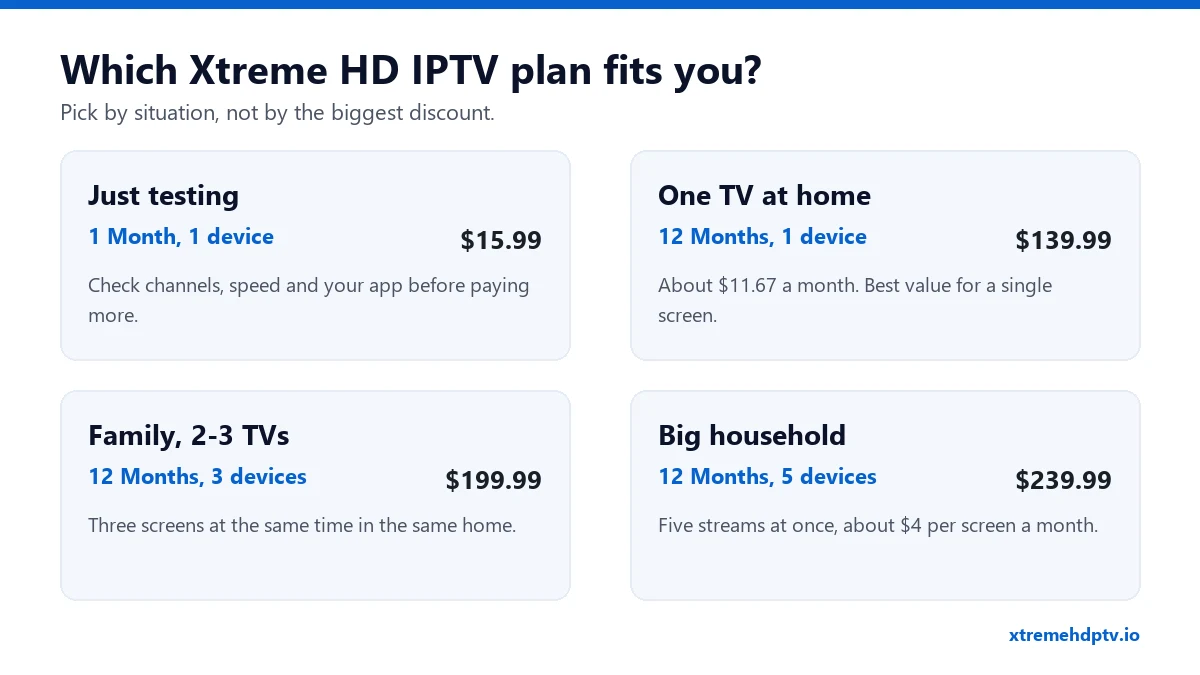
- You’re new to IPTV: take 1 month, 1 device ($15.99). Check your favorite channels, test the picture during evening hours, and make sure your player app feels right.
- One TV in the house: 12 months, 1 device ($139.99) is the best value.
- A couple or a small family with 2 or 3 TVs: 12 months, 3 devices ($199.99). It costs only $60 more a year than the single-screen plan, and nobody fights over the remote on game night.
- A big household: 12 months, 5 devices ($239.99) works out to about $4 per screen per month.
“Devices” Explained: The #1 Problem After Buying
This is the part that causes the most support messages, so it’s worth a minute.
A “device” on Xtreme HD IPTV means one stream playing at the same time. It does not limit where you install the app. You can put your login on the living room TV, the bedroom Firestick and your phone. But with a 1-device plan, only one of them can play at any moment.
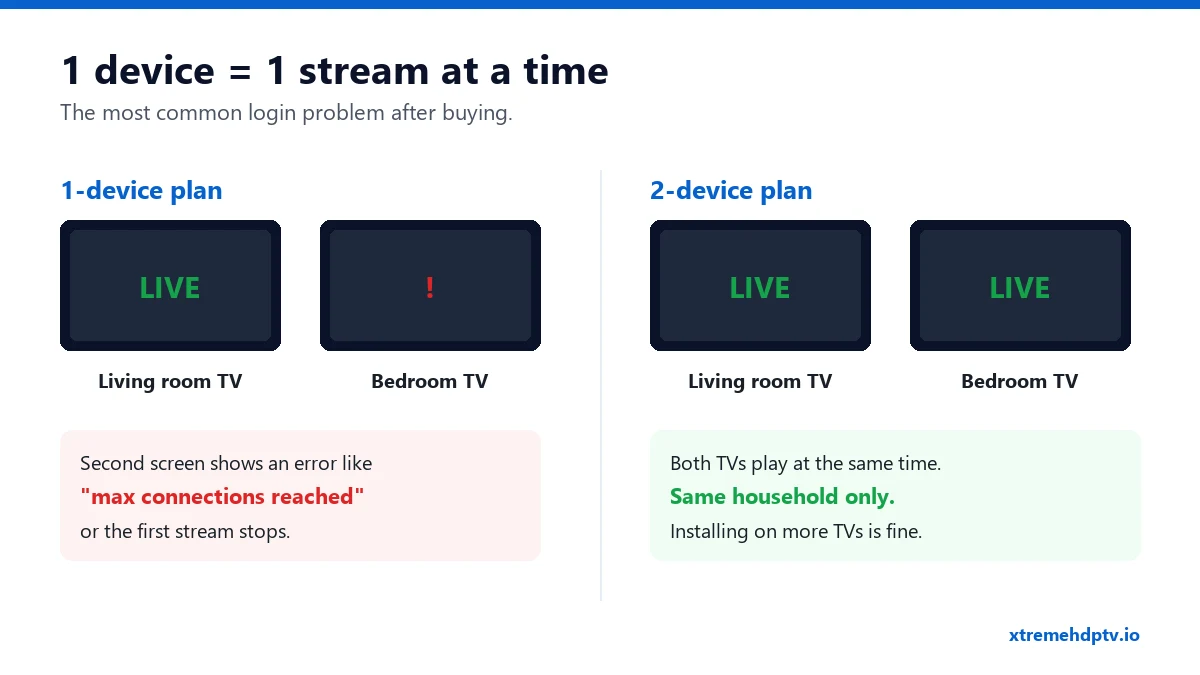
If someone starts a second screen on a 1-device plan, one of two things happens. The second screen shows an error like “max connections reached”, or the first stream suddenly stops. Nothing is broken. You simply need a plan with more devices.
One more rule: multi-device plans are made for screens in the same household. Sharing one account across different homes usually leads to connection errors.
What’s Included: Channels, Movies and Features
Every Xtreme HD IPTV plan gets the full library. There are no add-ons to buy later.
- 20,000+ live TV channels from the US, UK, Canada and around the world. That covers sports, news, kids and entertainment, plus local and international channels.
- 40,000+ movies and series on demand, updated regularly.
- PPV events, such as big fights and special matches, are included at no extra cost.
- HD and 4K quality on supported channels and titles.
- TV guide (EPG) and catch-up, so you can see what’s on and go back to shows you missed. Here’s how it works in practice: how to use EPG and catch-up TV on Xtreme HD IPTV.
- Anti-Freeze servers that spread the load during busy live events.
- Instant delivery of your login after payment and 24/7 support.
A quick tip on 4K: it needs a strong connection. Plan on at least 10 Mbps for HD and 20 Mbps or more for 4K. If you’re not sure what your home gets, read what internet speed you need for Xtreme HD IPTV in 4K before you choose 4K channels.
How to Set Up Xtreme HD IPTV
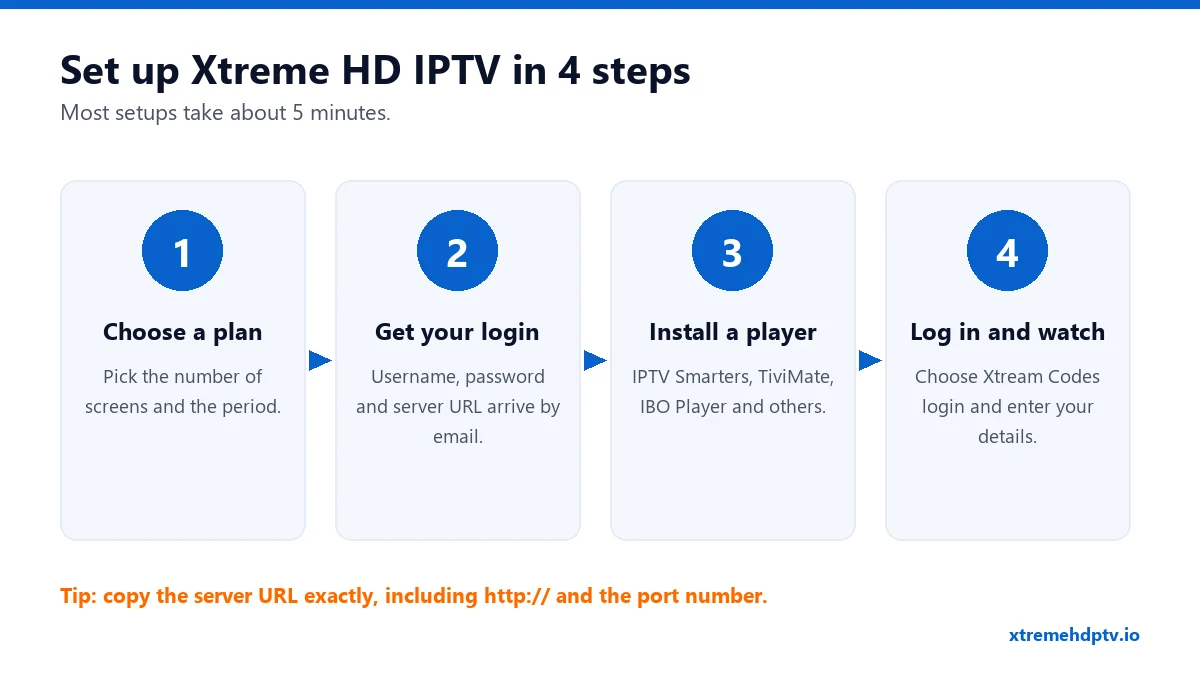
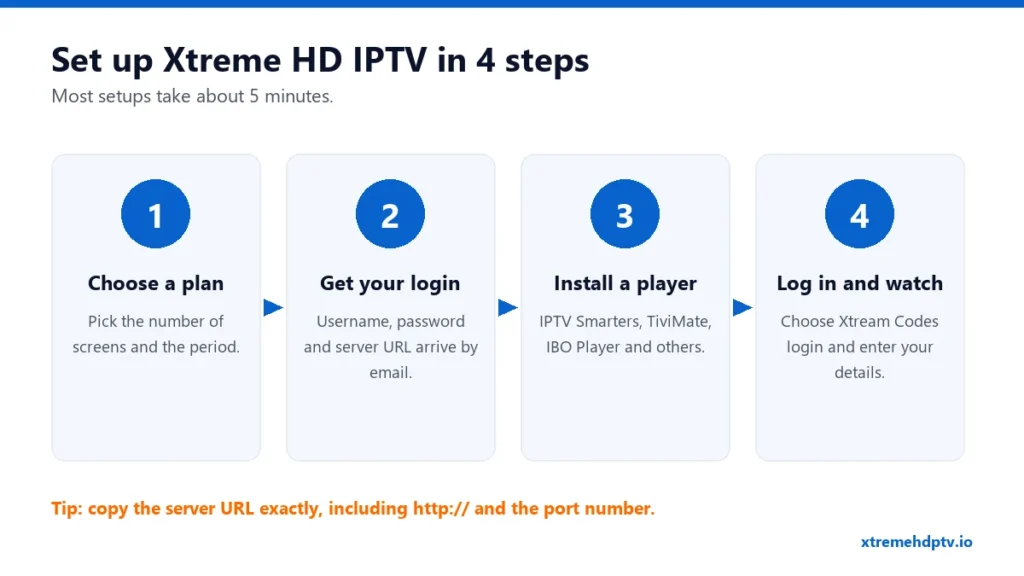
The setup is the same idea on every device:
- Choose your plan on the pricing page.
- Get your login. After payment you receive a username, password and server URL (Xtream Codes), or an M3U link.
- Install an IPTV player app on your device.
- Log in with Xtream Codes, enter your three details and wait a few seconds while channels and movies load.
Not sure whether to use the Xtream Codes login or the M3U link? We compared both in M3U vs Xtream Codes explained. Short version: Xtream Codes is easier and loads the TV guide automatically.
Which app to use on each device
| Device | Recommended apps | Full guide |
|---|---|---|
| Firestick / Fire TV | IPTV Smarters Pro, TiviMate, XCIPTV | Firestick setup guide |
| Samsung & LG Smart TV | IPTV Smarters, IBO Player, Smart IPTV, Set IPTV | Best apps for Smart TV |
| Android phone, box, Android TV | IPTV Smarters Pro, TiviMate | Setup guide |
| iPhone, iPad, Apple TV | IPTV Smarters Player, GSE Smart IPTV, iPlayTV | Setup guide |
| Windows & Mac | IPTV Smarters Pro, VLC | Setup guide |
| MAG box, Enigma2 | Built-in portal | Setup guide |
On Firestick, the one step that stops most people is “Install unknown apps”. If you can’t find Developer Options, go to Settings › My Fire TV › About and click the device name 7 times. The menu will appear.
Common Problems After Buying (and the Quick Fix)
Most problems in the first hour come from small things. Check these before you contact support. It’s usually faster.
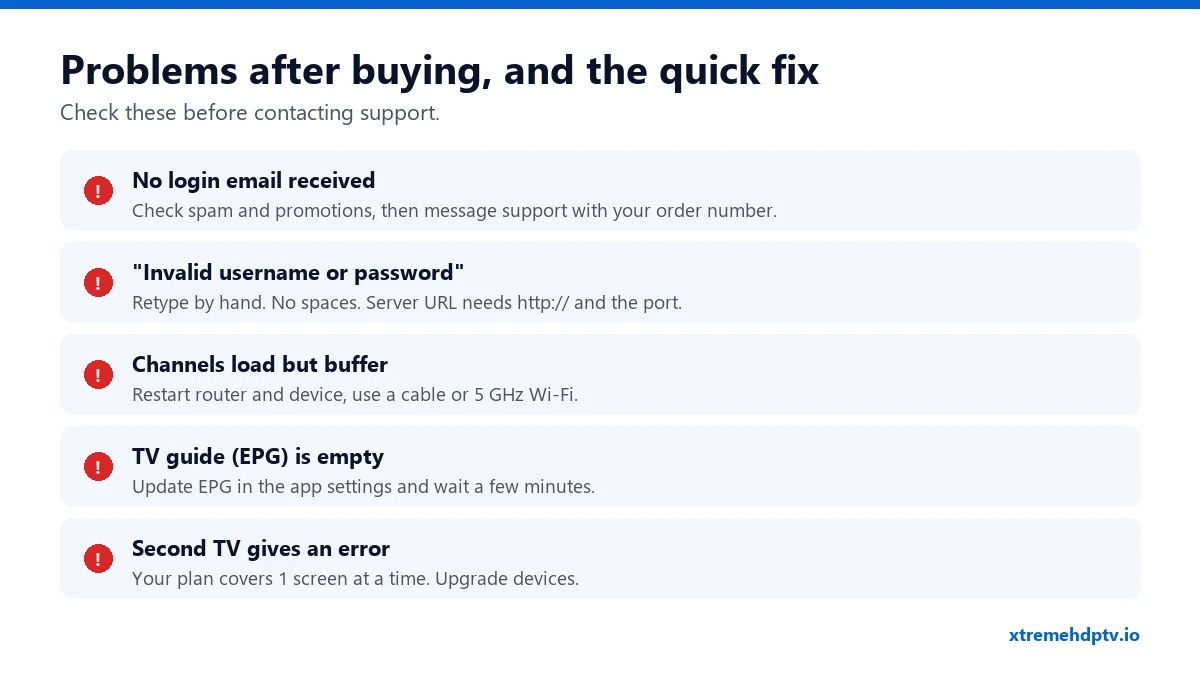
- The login email didn’t arrive. Look in spam and promotions first. Still nothing? Message support with your order number.
- “Invalid username or password”. Don’t copy and paste from your phone, because it often adds a hidden space. Type the details by hand. The server URL must include
http://and the port number exactly as you received it. - Channels load but keep buffering. Restart your router and device, then switch to a cable or 5 GHz Wi-Fi. The full list of fixes is in how to fix Xtreme HD IPTV buffering.
- The TV guide is empty. Open your app settings, choose “Update EPG”, and give it a few minutes on the first load.
- The second TV shows an error. Your plan allows one stream at a time. See the devices section above.
Frequently Asked Questions
How much is Xtreme HD IPTV per month?
It costs $15.99 for one month on one device. On longer plans the monthly cost drops to $12.50 (6 months) and $11.67 (12 months).
Does Xtreme HD IPTV work on Firestick?
Yes. Install the Downloader app, allow unknown apps, install an IPTV player such as IPTV Smarters Pro or TiviMate, then log in with your Xtream Codes details. Follow the step-by-step Firestick guide.
Can I use one subscription on two TVs?
You can install it on as many devices as you like. But to watch on two TVs at the same time, you need a 2-device plan or higher, and both TVs should be in the same household.
How fast do I get my login after paying?
Delivery is instant after your payment is confirmed. You receive your username, password and server URL, or an M3U link.
What internet speed do I need?
At least 10 Mbps for HD and 20 Mbps or more for 4K. A wired connection gives the most stable picture during live sports.
Are PPV events included?
Yes. PPV events are part of every plan at no extra charge.
Ready to Start?
If you’re trying Xtreme HD IPTV for the first time, take the one-month plan and test it on the TV you actually use. Do it in the evening, when networks are busiest. When it works the way you want, move to 12 months and save about $52 a year compared with paying monthly. You’ll find all the plans on the pricing page. If you get stuck during setup, our team can walk you through it on WhatsApp.
Need help with your IPTV?
Our team is available 24/7 to help you install and use your subscription on any device.
CONTACT US ON WHATSAPP